Showing posts with label Technology in Action. Show all posts

Tuesday, June 9, 2020

Why Is Email Important?

Outlook iconAlthough many of us enjoyed the interaction between each other in the office, there has never been a better opportunity to utilize technologies like email. Email isn't new by any means, but utilizing it as a primary communication source might be for some people. It's also worth noting that email is the primary official means of communication for Emporia State University. In a world where no physical meetings are taking place, email usage has increased, and rightly so!

There are many benefits to emailing people for communication methods, especially if you're using Outlook for Office 365. Your emails between colleagues are documented and are readily available by a quick search for a word, person, or subject. This potentially eliminates any miscommunication issues that you could be having with colleagues. Because of this feature, it's important to remember to write well thought out emails. Be concise with what you are trying to convey and the digital workforce will be thankful! Another benefit is simply keeping everyone in the loop. Being able to CC your colleagues/boss into your emails gives them a way to keep track of what's going on with certain projects/tasks. One could also argue that email is more secure than the word of mouth communication method. Outlook for Office 365 allows you to 'Encrypt' an email with various options depending on the confidentiality of the email's content. Be sure to learn more about the 'Encrypt' feature by following this link.

Hopefully this blog provides some insight to why email has become so important in our everyday workflows. Although this blog post is generally targeted at faculty and staff, it also applies to students with their student Gmail accounts. Stay on top of your inbox and your colleagues will take notice!

Sam Derksen
Web Developer
Web and Digital Strategies

Friday, October 18, 2019

Does iPad OS now make the iPad a computer?


iPad with iPad OS


During the 2019 World Wide Developers Conference, Apple announced an all new Operating System for the iPad platform. This meant we would now have macOS, iOS, watchOS, tvOS and finally the newly announced iPadOS.

iPadOS is built with iOS 13 as the foundation, so a lot of iOS 13 features are built-in. But with a twist! It packs additional features designed exclusively for the iPad, making it a whole new powerhouse, but with a significant learning curve. Fret not, with true dedication to learn and the passion to figure out how it fits into your workflow, you too can take advantage of this impressive platform.

Currently iPadOS can be installed on the following devices:
  • iPad Pro (Series 1, 2 and 3)
  • iPad (5th, 6th and 7th Generation)
  • iPad mini (4th and 5th Generation)
  • iPad Air (3rd Generation)
  • iPad Air 2
So what makes the iPad more than an iPhone with a bigger screen?

Better Multitasking. Now with improved Slide Over you can have multiple 'iPhone sized' apps always running, ready to be accessed with one swipe. Now, you can also have the same app running in multiple windows. You can also have the same app in multiple work spaces! Want to see how many instances you have running of a particular app? You can now with the App Expose feature.

Floating Keyboard and Swiping. You know how the keyboard would take 1/3rd of the available screen real estate of your iPad? Not anymore! You can shrink the keyboard to an iPhone sized keyboard, and now even swipe for easy one handed use.

Better File Management. Apple has finally overhauled the way you access and store your files. With the added feature of connecting external drives (better have your dongle handy) and syncing your cloud drives (Google Drive, OneDrive etc).

New Home Screen with Widgets on the ready. Having widgets always on the home screen improves upon your overall experience.

Apple Pencil latency upgrade. It's as smooth as writing on paper, but on glass instead. With just a software update they've managed to improve the latency to a low 9 milliseconds.

Text Editing with ease. You now have gestures for multi-select, cut, copy, paste, undo and redo.

Desktop Grade Safari. One of my biggest issues was getting served mobile websites on my big iPad screen. Well not anymore!

Sidecar. If you have a MacBook and an iPad, then this one is for you. Extend your MacBook work space to your iPad with pencil support. MacOS on your iPad? Sounds like a great work system!

Side Note: I've tried to use this in three different instances and failed. Unfortunately, Sidecar is limited to Macbooks with the butterfly keyboard, Mac Mini 2018, iMac late 2015 and later, iMac Pro 2017 and later, Mac Pro 2019.

Better Screenshots. You can now use your Apple Pencil to take a screenshot, with the added ability of taking full page screenshots.

Mouse Support. Don't get too excited about this one yet! Mouse support is available only as an accessibility feature. So, the experience is very limited.

Font Management. You can now have custom fonts installed and use them in all your apps. Simple as that.


Although, this isn't a 1:1 laptop replacement, it definitely is a great laptop alternative for. The iPad is a behemoth of a platform, that will allow you to perform 90% of your desired tasks (albeit the special software that you'd currently need a computer for.) Now. all you have left to do is figure out how you're going to revamp your work flow to accommodate for the touch screen!


Screenshots of an iPad
New Home Screen + Widgets | Better Screenshots with Markup | QuickType Floating Keyboard

Screenshots of an iPad
Multiple instances of the same app & Desktop Grade Safari |
Full page Screenshots with Markup | Multiple Apps in Slide Over

Screenshots of an iPad
Sign In With Apple


Saandhyarag Sasidhar
Student Operations Manager
Web and Digital Strategies

Friday, September 27, 2019

Just Wing'in It

Just Wing'in It


Drone flying overhead


What is Wing?
Wing is a drone delivery service owned by Alphabet, the parent company of Google. Similar to the Amazon drone delivery service, Wing aims to deliver over-the-counter medications and other health related items to your doorstep “within minutes” of online ordering. The company is partnering specifically with Walgreens and FedEx to complete this task, hoping to find a faster and more time efficient method of delivering your medicine.Wing aims to be a pioneer in the drone delivery service, becoming one of the first drone operators certified as a commercial carrier by the FAA (Federal Aviation Administration).

Where is Wing?
DroneWing hopes to compete with other companies’ delivery services, such as Amazon Prime and a newly announced CVS drone delivery prototype. The pilot program will launch in October 2019 in Christiansburg, Virginia, allowing residents of the town who live within the “designated delivery zones” to choose from over 100 individual products ranging from children’s snacks to cough and cold medicine. In December, Wing announced the launching of a trial service in Finland, offering free delivery to residents within the capital city; and was just approved to launch the service in 3 Australian cities. Stay tuned, as Wing delivery could be delivering M&M’s to your dorm room within the next few years.

Tyler Parker
Social Media & Marketing Student Assistant
Web & Digital Strategies

iOS 13 and Watch OS 6

iOS 13 and Watch OS 6

Since Apple released the well anticipated iOS 13 and Watch OS 6 updates yesterday, I've had the opportunity to put it through a week of testing.

If you have an iPhone SE, 6S, and everything after that (the 7, 8, X, XR, XS) and have been thinking about updating, go ahead! You're going to enjoy the new life it breathes into your Apple devices.

NOTE: Just to be on the safe side, be sure to back up all the valuable data on your device and keep the phone plugged in while it updates. Better safe than sorry, trust me.

Since a majority of our users are iOS users, I'm sure you're wondering, "What do I get from this update and why should I even bother?" Well, I'm glad you asked.

Let's start with the top features from iOS 13.

  • You now have a system wide Dark Mode. Let's sign a petition and dark mode everything!
  • Swipe Keyboard. Try swiping a word on your keyboard! It's an easier and faster method for typing with one hand! They call it 'QuickPath'..
  • Faster FaceID. Apple claims 30% faster!
  • New Built-In Photo and VIDEO Editing Tools. If you're a digital creative, you're going to appreciate this!
  • Find My (Now combines Find my iPhone and Find my Friends). Now, even if your iPhone is not connected to the internet you'll be able to tell where it is.
  • Files. Now you have the ability to connect external drives and USB's natively. Along with unzip capabilities.
  • Safari. You now have access to a built-in download manager! Along with upgraded browser capabilities.
  • Reminders.  App Updates.
  • Notes. App Updates.
  • Mail. App Redesign
  • Siri. Siri now sounds a lot better!
  • Better Screenshots. 
  • Control your Contact Information Persona. If you someone adds you as a contact, the name and image you want will automatically pull into their contact.
  • Memoji Stickers. Extend your Animoji persona and create new Memoji stickers.
  • Sign In with Apple. Before you had the option to make an account, or use the convenient Sign in with Google and Sign in with Facebook. Now, there's a new way to sign in! 
  • Use your Gaming controllers. If you enjoy mobile games, now you can connect your favorite Xbox or PS4 Controller and start gaming!


Next we got Watch OS 6.
  • New Watch Faces. Cool new styles to try!
  • Dedicated App Store. All the more apps for your watch!
  • Noise Level. If you spend too much time in a loud environment, you'll be notified!
  • Voice Memos. Got a quick thought? Narrate it to your new best friend.
  • Cycle Tracking. Apple's big on Health
  • Calculator. Calculate right on your wrist! Take it a step further and now you can easily know how much the tip will be and how to evenly split the bill.
  • Activity Trends. Because the more health data you have, the more you strive to succeed!


There were minor bugs I have seen or had colleagues report to me. However, Apple has released iOS 13.1 today, and it should squash all the bugs (if any) and provide improvements to your overall experience. Apple also released iPad OS today and I will be going over it next week! 


Have you updated to iOS 13.1 yet? If so, what are you currently enjoying about it?


Saandhyarag Sasidhar
Student Operations Manager
Web and Digital Strategies

Friday, August 30, 2019

SkyPrint PLUS - Copy, Scan and Print


Printer
We've got all New SkyPrint PLUS Stations throughout campus. 

You can now use the same printer for both your Black/White and Color printing needs. 

Need to copy documents? You now can from the same station! 

To make it even better, you can now scan documents and send it to your Email, OneDrive or Google Drive, all from the same SkyPrint Plus Station!


To sign into your account, use the built-in keyboard on the printers. 


OR 

If you're ready to 'tap and go', set up fast login and start using your Hornet Card for a quick, easy and secure way to login into SkyPrint.


Rest assured, the quality of prints are now twice as good.

SkyPrint Plus Logo

If you're having troubles, be sure to read the instruction manuals attached to the printer.

Find more info, including all of our SkyPrint locations from Hornet 365's TechSite
SkyPrint Plus Station
Hornet Card Scanner


Saandhyarag Sasidhar
Student Operations Manager
Web and Digital Strategies

Friday, March 15, 2019

Accessibility Extensions


Read & Write
Emporia State University recently acquired updated versions of 'Read & Write' and 'EquatIO' software. Both of these are accessibility extensions compatible with Google Chrome that can help you with everyday tasks. 'Read & Write' can help you understand web pages better as it reads it aloud to you. This gives you an opportunity to actively listen and take notes if you'd like. 'EquatIO' is a tool that will help you convert your own handwriting to math equations on your computer. This is extremely helpful when writing out math equations on your computer. Faculty and students can download this extension, free, by selecting this link and following the instructions on the page. All-in-all, we hope that these two new tools will help everyone with your learning process!

Link to download.

Sam Derksen
Web Developer
Web and Digital Strategies

Friday, November 16, 2018

Eerie or Revolutionary? You Decide.

Google Assistant


Google announced Google Duplex during the Google I/O 2018. This is a new revolutionary technology that allows your AI personal assistant to conduct natural conversations and carry out “real world” tasks over the phone.

Imagine telling your Google Assistant to complete tasks such as scheduling hair salon appointments, or even booking a table at a restaurant. The system is very well developed and conversations between a fully automatic computer system and real businesses sound natural and human like. This is a huge leap in Artificial Intelligence technology as the assistant can understand complex sentences, fast speech, and long remarks, so it can respond naturally in a phone conversation

It will positively impact businesses who regularly schedule clients like doctors and lawyers and could have the A.I. do that on their behalf. Small businesses can also benefit, as research shows that 60 percent of small businesses who rely on customer bookings don’t have an online booking system, according to Google’s blog.

Final release dates are yet to be announced, and is most likely to arrive first in the Google Pixel phones.

For more information see what Google has to say; eerie or revolutionary? You Decide.

Saandhyarag Sasidhar
Student Operations Manager
Web and Digital Strategies


Friday, October 5, 2018

Apple Watch Series 4


APPLE 
WATCH 
4


On September 12, 2018, Apple held its annual special event where they released the iPhone XS, the iPhone XS Max, and the Apple Watch 4. After taking it all in, I knew I had to have the new watch.

I recently had the opportunity to daily drive the Apple Watch Series 4 (44mm) and it is a beautiful combination of machinery and technology.


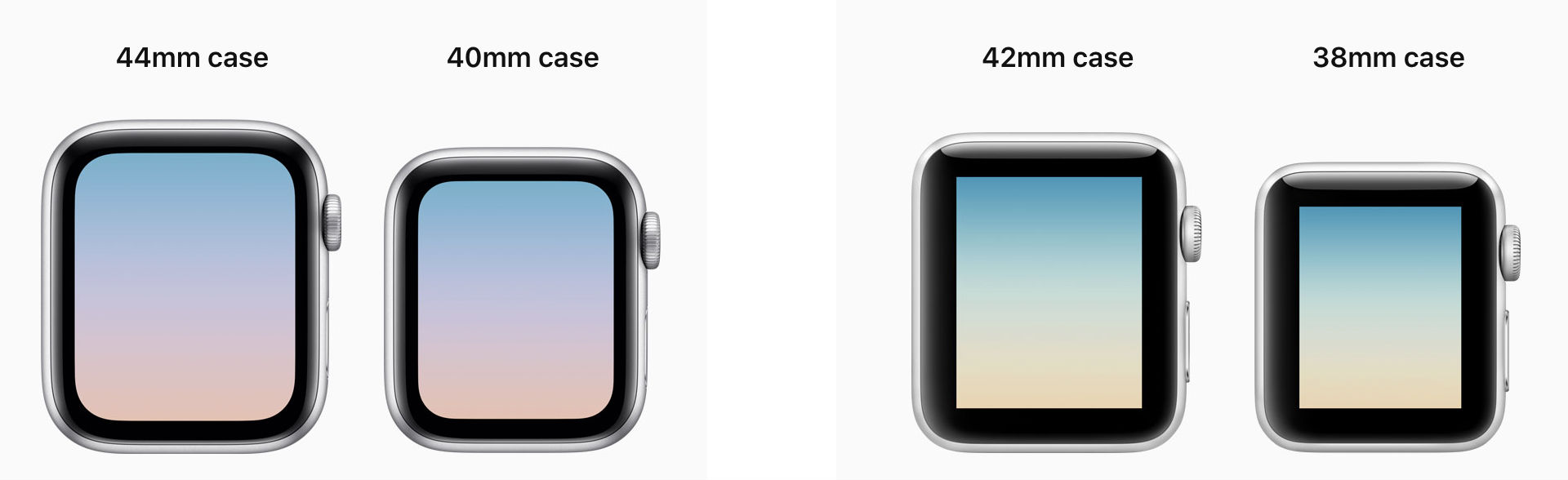
  • A larger LTPO OLED Retina display in same form factor (40 mm and 44 mm), previously (38 mm and 42 mm).
  • Along with a 2x faster S4 processor
  • Better Haptic Feedback
  • New Digital Crown
  • FDA approved ECG feature (coming soon)
  • Fall Detection that can contact Emergency SOS if you've taken a hard fall
  • Optional  Improved Cellular Connectivity
  • Louder Speakers
  • New watch faces
  • New workouts added
  • Apple Pay

Image result for apple watch 4

For me, personally, it's a nice extension of my phone and productivity while tracking various health elements. I'm sure as time goes on there will be various applications that one could use straight from the watch. On top of all that, it gives me the excitement and feelings of a a child with a new toy. What more could you ask for?

If you're on the previous generation Apple Watch, you can get the software upgrade to watchOS 5 now!


Emporia State University Faculty and Staff: If you think you might be able to use the the Apple Watch 4 for work, contact the IT Help Desk for more info.

Saandhyarag Sasidhar
Student Operations Manager
Web and Digital Strategies

Friday, September 7, 2018

An Upgrade for Student Projects

Blue Yeti and Blue Yeti Nano.
Blue Yeti Nano and Blue Yeti. | Photo: Blue

Students are given projects some semesters where they must recorded a video on a particular topic. Most student use their default computer mic which is likely to be low quality and hard for professors to understand what is being said. A microphone can improve the audio quality, but most students do not want to pay hundreds of dollars for the improvement... enter the Blue Yeti Nano.

Blue Microphones has created the Blue Yeti Nano: a smaller and cost effective alternative to the company's original Blue Yeti.

Having a microphone like the Blue Yeti Nano will improve student's quality of audio work while staying relatively inexpensive. After graduating college, students can use microphone in their career to deliver professional performance to any work or meetings requiring audio.

Donald F. Goode
Web Developer
Web and Digital Strategies

Sunday, August 26, 2018

Introducing the new Hornet 365

Hornet 365 homepageThis past week, visitors to hornet.emporia.edu, aka the gateway to Hornet 365 services, saw a visual upgrade.  This first step moves us closer to the ultimate goals of Hornet 365 to become the next generation portal for all ESU digital services.

What about Buzz In?

The current portal, Buzz In, will be retired in the coming months, but will continue to be operational while we work to add new content and features to Hornet 365.

If YOU build it...

That's right, we want you as a student, faculty, staff or guest of ESU to help us build it!  Give us your feedback (you'll see a fancy new button on hornet.emporia.edu) to fill out a short form.  Because the new 365 will run in parallel with Buzz In, we're taking the unique opportunity to work collaboratively with groups across campus to help make Hornet 365 better throughout the fall 2018 semester!

What's New?

Hornet 365 has a lot going on under the hood, not least of which is the fact that the authenticated sites (or the parts you DO have to log in to) are powered by Office 365.  In addition to FREE Microsoft Office, there are many different services.  We'll cover those in future posts, but here are just a few of the new things that are live now:

Hornet Sites - These sites are just like a public website, but you need an ESU userid and password to access them.

g365 - A special service for group emails, sharing files, a team collaboration space, integration with Microsoft Teams and more!

w365 - A place for sharing files with your department, committee or standing group.  Just files here, plus it integrates with OneDrive!

OneDrive - Okay, this one isn't new, but there is a feature that is--the ability to intelligently synchronize files to your computer.  The OneDrive client is able to determine which files you're using and which one's you're not and only sync the one's you've used recently.  All of your files still live in the cloud and are there whenever you need them.  This saves on disk space and bandwidth.  Right now, this feature is exclusive to Windows.  OneDrive gives every ESU student, faculty and staff member 1 TB of file storage space that you can access via Windows/Mac file explorers, web browsers and your Apple/Android mobile device.

Hornet Spaces - this is a new ESU service, or collection of services showing you all of the various maps of ESU.  From a details overhead map to a Street View-style 360 service that gives you the ability to virtually walk throughout the entire campus, we've got them all in one place.  Plus, don't miss our new site about campus computer labs currently being beta-tested.

Newsstand - Have you ever needed to share a file or document in a way that makes it pleasant to read?  Would you like to share it with the public or even embed it into another website?  PDF's are boring--why not add some interactive features to your documents?  Those are just some of the things that we've made available with the new service called Newsstand.  Powered by the popular web service Issuu, Newsstand is available to any ESU department, recognized student group, etc. at no cost.

These are just a sampling of some of the great new things that are coming to Hornet 365!  Stay tuned to the blog and our social media for more coverage of the services we've mentioned here and even more in the future!

#MyHornet365

-Brian Osbourn, Director, Web and Digital Strategies

Reserve a Study Room in Richel Learning Space!

Emporia State's IT department just launched a new service in Richel Learning Space (Cremer Hall 193) to make your experience just a little more convenient. Powered by iPads and Office 365's Bookings, you can reserve study rooms in Richel Learning Space in just a few seconds! If you need a space to study with your group, stop by ahead of time or reserve available rooms when you arrive. This software will also send you a reminder e-mail so you won't forget when you reserved your room. Some study rooms are equipped with a Hornet 365-powered computer, TV and a whiteboard, so don't miss out on these exciting new features!

Sam Derksen
Student Web Developer
Web and Digital Strategies

Tuesday, April 10, 2018

Introducing our brand new "Protect the Nest" board game!

Here on our Information Security team, we always work to come up with more fun ways our students and employees could be engaged and learn about important security topics. Last week, we proudly released our brand new "Protect the Nest" board game specifically created for ESU employees!


The game walks players through a typical work day at ESU while they solve security challenges and scenarios along the way.


The IT Helpdesk and Learning Technologies teams helped us create these awesome little 3D-printed Corkies to use as game pieces. 


If you had to miss our Wine Tasting & Board Game Night but would like to check out the game or borrow it for your office or class, contact us at itsecurity@emporia.edu.

Friday, February 9, 2018

Introducing Whiteboard from Microsoft

Have you ever brainstormed with your team and listed everything on a marker board only to have to resort to taking a blurry photo of it for posterity? How did that work out for you?

Well, now, Microsoft has come up with a solution.

As an ESU student, faculty or staff member, you have access to preview a new tool called Microsoft Whiteboard.

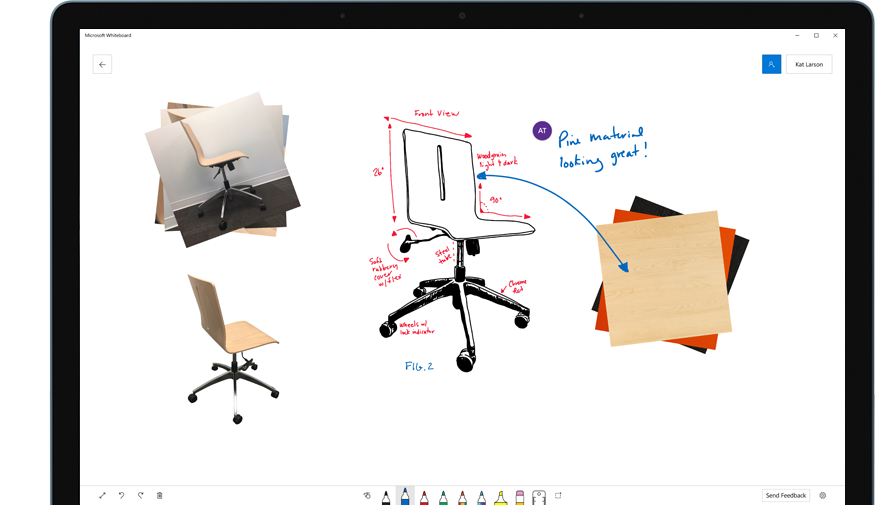
What is it?  It's your own personal digital whiteboard that installs on your Windows 10 computer.  Display it on a big TV screen for all to see or share with your friends and colleagues right from the app.  With Whiteboard, you'll always have your notes, brainstorms and collaboration sessions at the ready.  Resume a meeting where you left off or avoid worrying about someone erasing your work in a breakout room or shared conference room.

You can use your fingers, keyboard or a digital pen to write on the whiteboard.  It works particularly well with pen-enabled computers such as the Lenovo X1 Yoga or Microsoft's own Surface computers.

You can also create multiple whiteboards, so that you can keep previous iterations for future reference.


Whiteboard is in preview right now and is currently exclusive to Windows 10 computers.  https://products.office.com/en-us/microsoft-whiteboard/digital-whiteboard-app

-Brian Osbourn, Director, Systems & Client Solutions

Friday, March 31, 2017

IT Hosts TechFair

ESU IT hosted our annual Tech Fair on March 15.  Students were able to see and interact with new and emerging technology.  IT and other exhibitors demonstrated equipment, software and services all around the theme of "Exploring Worlds".  Highlighting the event were multiple virtual reality stations including HTC Vive, Oculus Rift and Google Cardboard.  Students could also see 3D printing, a 46" interactive BuzzHub display from the library and a security demonstration showing how hackers can easily compromise your password.

Thursday, February 23, 2017

ESU IT goes to the Gala

ESU's Information Technology department joined the Hornet Nation at the Now & Forever campaign celebration event on Saturday, February 18.  In addition to providing a multitude of technology resources including TV's, computers, digital signage and video services, we were also excited for the opportunity to share several examples of bleeding edge technology.  Guests were able to experience a virtual world with our virtual reality setup, while others were able to see a creation come to life from one of our 3D printers.  IT didn't have the monopoly on technology as we also worked with other departments who showcased everything from large format interactive displays to a live-streamed lightboard demo!  We had a great time working with Sarah Eimer and her team at the Foundation and hope to be able to bring more experiences with technology to the ESU community in the future.

Tuesday, February 7, 2017

Technology in Action: New Kiosk in Career Services

Last week, IT worked with Career Services to design a new kiosk for students to sign-in by swiping their Hornet Card and making selections on a touch screen--no keyboard or mouse needed.  The kiosk itself is based on a Microsoft Surface Pro 4 and a Heckler Design mount.  If anyone would like more information on this design, please contact the IT Help Desk.