Apple’s new iOS 14 and iPadOS 14 are here! Among the many new features included are widgets on the home screen, apps rearrangement, privacy improvements, and much more! Today we are reviewing 8 of the coolest features you might not know about. iOS 14 is available on the iPhone 6s and newer iPhone. We will also review the new iPhones announced on November 13. The new iOS features may improve your experience using your iPhone or iPad--and if you're considering the Apple ecosystem, this is just a sampling of the innovation and ease of use that is available in the most recent releases.
The Safari Privacy Report
One of the new hidden features in iOS 14 includes the Safari Privacy Report. Safari now allows you to see the percentage of websites that contacted trackers, as well as the trackers prevented from following you. To see your privacy report, simply click on the “AA” in the left part of the address bar within Safari.
You can now choose your default email or web browser
We’ve all been annoyed when we can’t use Gmail or Outlook, as our default mail client or even Chrome as our default web Browser. But that limitation comes to an end in iOS 14 as it is now possible to set any browser app you want as your default browser. Similarly, you can set a default email client.
In order to enable this feature, go to the setting app of your iPhone and then scroll down to the app you want to enable as your default web browser/mail and then simply just click on “default app” to choose your favorite app.
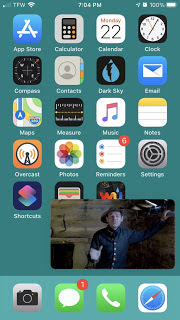
Watch videos in “Picture in Picture” mode
When watching a video from your iPhone or iPad, it is now possible to leave the safari app and use your other features of your iPhone like answering your DMs or checking your email and the video will still be playing from the corner of your device.
Unfortunately, this feature is not available for the YouTube app yet, however, this feature is available when watching YouTube from Safari or Chrome.
Tap the back of your phone to enable cool stuff
In order to enable this cool new feature, go to the Setting app>Accessibility>Touch>Back Tap.
For example, you can now take a screenshot or shazam a song you hear by double-tapping the back of your phone.
Lock an App
If you have some apps that contains private information and you don’t want anyone to be able to go on those apps when they borrow your phone, it is now possible to lock some apps on iPhone.
To enable these new features, go to the setting app>screen time>Use screen time passcode (create your passcode that will be used to unlock the applications) then Click on apps limits>Edit list.
The orange and green indicators
Are you scared that face camera is recording you? Well, you don’t need to be scared anymore; a small orange dot next to the battery indicator will appear if your microphone is active, while a green dot will appear if your camera is in use.
Mirror selfies
I don’t know about you, but I used to hate when I took a selfie with my iPhone and the selfie just doesn’t look right because the camera is inverted. But this is not a problem anymore with the mirror selfies! The result is just so much better. Go ahead, try it out!
In order to enable this feature, go to Settings > Camera and turn on Mirror Front Camera.
Stack your widgets
Everyone knows about the new widgets in iOS 14, but did you know you could stack them? To enable this feature, hold your screen and simply drag one widget into another one.
In order to enable this feature, go to Settings > Camera and turn on Mirror Front Camera.
Stack your widgets
Everyone knows about the new widgets in iOS 14, but did you know you could stack them? To enable this feature, hold your screen and simply drag one widget into another one.