Showing posts with label Upgrade. Show all posts

Friday, September 18, 2020

Shocking New iOS 14 Features

If you are an Apple Product user like a lot of us here in IT, you would know that the most recent software update of iOS 14 for iPhone and iPad was released yesterday. This update was a long-awaited arrival for some, packing in a lot of new features for users to enjoy. 

Today's writing will be an overview of some of the features that stuck out to us in this packed iOS 14 update! iOS 14 can be used on iPhone 11, 11 Pro, 11 Pro Max, XS, XS Max, XR, X, 8, 8 Plus, 7, 7 Plus, 6S, 6S Plus, SE (2020, 2016), and 7th gen. iPod Touch.

App Library

    The App Libray is a new feature never seen before on Apple products. Putting all of your applications in one easy to use library one swipe over from your usual app pages. Editing your pages of applications is a breeze, whether you like lots of pages or one page of 6 apps, there are finally options for customization. 

Widgets


    Speaking of the home screen, Apple did not fall short of the bar. Being able to add in widgets for your calendar, weather, clock, stocks, and many more. Although they did not add customizations for third party applications, I imagine that there will be updates to come that added those options.
        (Batteries, calendar, clock, files, fitness, maps, music, news, notes, photos, podcasts, reminders, screentime, shortcuts, Siri suggestions, stocks, TV, tips, and weather.)


Picture-in-Picture
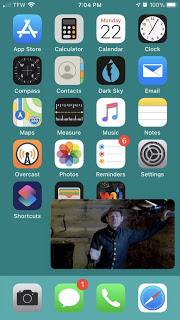

    
In the past, we have had to "pause" when we leave a Facetime call, and have the green icon at the top of the screen. Apple really pulled a wild card on the PiP capability on this update. Bringing the call to a smaller tile on your home screen that allows you to remain on the call, but also be on your phone. This isn't just with Facetime, but several other media playing apps as well.

Translate App

    Google translate was a needed app for some, and Apple not providing that feature was something a lot of people had brought up. Well, ask and you shall receive just like a lot of the new update features, iOS 14 provides an application called Translate. 
    Being designed for 11 different languages that can be used in conversation setting in conversation mode, or in offline mode. Conversation mode allows you to turn your iPhone to landscape orientation. Tapping on the mic icon to begin talking, and automatic language detection transcribes what you are saying in real-time. The translation provides the text on the screen, followed by translated audio. 

This is just a brief overview of the incredible amount of detail that went into the update. Apple listened to their users for this update which is very obvious, thankfully enough we can expect updates with bugfixes, and later improvements expanded within the software.

As always, questions and concerns can be answered by contacting the IT Help Desk.

Stay healthy Hornets!

Dakota Taylor
Social Media Student Assistant
Web & Digital Strategies


Friday, September 7, 2018

Youtube Signature Devices 2019

YouTube recently released a list of nineteen Signature Devices for 2019, that are able to deliver the
best-in-class YouTube viewing experience. Some of the factors that they took into consideration were:
  1. High dynamic range support
  2. Reliable DRM performance
  3. 4K decoding
  4. 360° video
  5. High frame rate
  6. Next generation VP9 codecs

+ Samsung Galaxy Note 9
+ Xperia XZ2 Premium
+ U12+
+ OnePlus 6
+ G7 ThinQ
+ Xiaomi Mi 8
+ Xperia XZ2 Compact
+ Xperia XZ2
+ Nokia 8 Sirocco
+ Mi Mix 2S
+ Samsung Galaxy S9
+ Samsung Galaxy S9+
+ Google Pixel 2
+ Google Pixel 2 XL
+ Huawei Mate 10 Pro
+ Samsung Galaxy Note 8
+ LG V30
+ Samsung Galaxy S8
+ Samsung Galaxy S8+


The following devices demonstrate the latest in video technology, and can enjoy vivid 4K HDR videos, immersive 360° video, and fast video load times - all while using less bandwidth.

However, you would have noticed by now that no iPhones have been mentioned in this honorary report. Now, it would be wise to take this report with a grain of salt, as Google owns the Android platform, the YouTube platform, and has designed the highly optimized VP9 codecs that give you the above mentioned abilities.
Apple doesn’t support the VP9 codec, and this is why Safari users don’t have the option to watch 4K footage on YouTube.

Although, this wouldn't make a huge difference while purchasing new hardware, it would definitely be making the rounds in the new device marketing.

Saandhyarag Sasidhar
Student Operations Manager
Web and Digital Strategies

Thursday, November 9, 2017

PC's are being Powered Up!

Sometimes, a minor upgrade can really give your PC a performance boost and extend its life by a year or more.  In IT, we're now providing the service of replacing older hard drives with new, speedy solid state drives (called SSD's), as well as upgrading to the latest Windows 10 version.  Users can expect to see around 30% greater performance when booting your PC and working with files in Windows 10.  The service is available to most University-owned computers purchased in the last 2-3 years.  There are two options available:  a 256 GB SSD for $120 or a 512 GB SSD for  $200.  There is no charge for Windows 10, however the service is not available if you want to keep Windows 7.  Additionally, extra memory may be added to your PC to give it an even greater boost at a very minor cost.  If you are interested, please contact the IT Help Desk to request a technician verify your computer is a suitable candidate and discuss which options will result in you seeing the most benefit.
IT is also advancing an initiative to "Power Up" public lab computers over the next few months.  We will be adding new SSD's to supported public lab computers at no cost to the lab owner.  We have completed the lobby of William Allen White library and will next be working on the LEC, 2nd floor WAW PC's, Richel Learning Space, and the Communications/Theatre Lab.

-Posted by Brian Osbourn, bosbourn@emporia.edu