Showing posts with label Industry News. Show all posts

Friday, April 3, 2020

Keeping Yourself Entertained in the Time of Coronavirus

The coronavirus has impacted everyone from business owners and families to students. I'm sure we've all seen the memes/videos about how bored people have gotten during these times, but that's no reason to worry. I am going to share some of the best entertainment sources you can take advantage of during this pandemic!

As a student, you are given 6 months free Amazon Prime by signing up with your @g.emporia.edu account. Amazon Prime offers many things free with its subscription such as movies, TV shows, books, and discounts on select products! Follow this link to learn how to activate your trial and see some of its benefits!

Quibi Promo imageA new streaming service, Quibi, is offering a 90 day free trial after they launch this April 6th. Quibi is an interesting concept because they will be offering original, new, TV shows... but the episodes will be 10 minutes or less in duration. This is an excellent platform for short study breaks or to simply invest less time per episode during your content binges!


Netflix is one of the most popular streaming platforms nowadays, and because of that, I am going to give you all my top 3 series to watch!
    Altered Carbon poster
  1. Ozark - Ozark is a Netflix original series that follows a financial advisor, and his family, as they try to keep their best to deal with money laundering issues. There are three seasons out already, and I expect there to be at least one more in the future.
  2. Altered Carbon - Altered Carbon is also a Netflix original series that follows Takeshi Kovacs, an elite soldier in a futuristic world. It's incredibly interesting to watch and learn how their world is. There are two seasons out already, and I would expect more in the future!
  3. Money Heist - Money Heist is also a Netflix original series that follows a group of criminals and their plan to rob the Royal Mint of Spain. It's action packed with a lot of clever moments. There are four seasons out, which includes the fourth season which came out TODAY, April 3!

Hopefully some of these suggestions can give you some entertainment in this time!

Sam Derksen
Web Developer
Web and Digital Strategies

Friday, March 27, 2020

New Apple Products

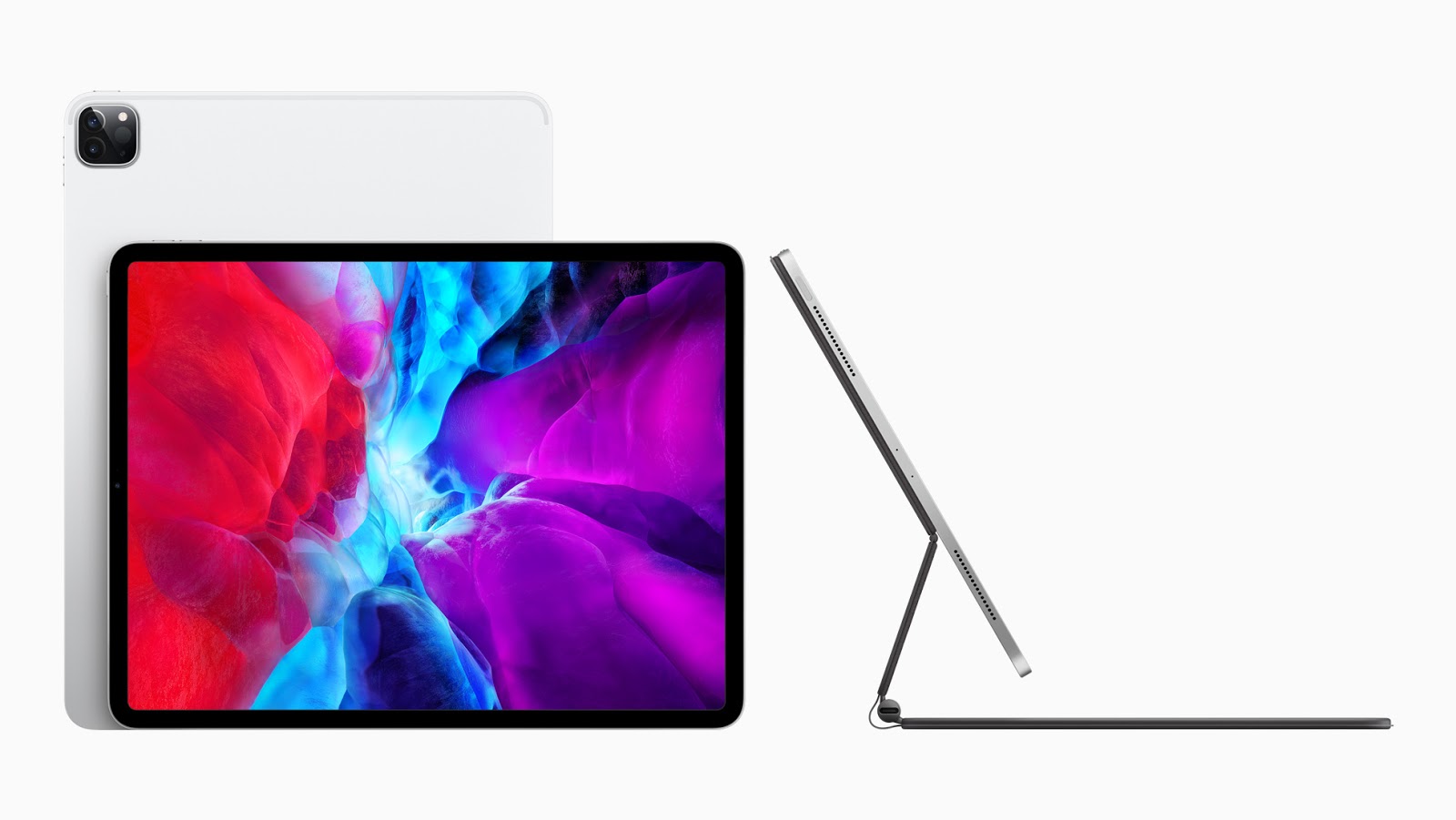
Apple iPad Pro 2020In the midst of this crisis, Apple managed to release the new iPad Pro. One could argue that there couldn't be a better time due to many educational institutions moving their classes to an online platform. iPads are becoming more and more similar to your traditional laptops with enhancements that allow you to do most things that you could do on a Windows or Mac laptop. The new iPad Pro boasts an A12Z bionic chip, which is slightly better than the A12X chip included in the last version of the iPad Pro. This means that this iPad will run all of the software you would need for school flawlessly.

Along with the introduction of the new iPad, Apple released a new 'Magic Keyboard' to go hand-in-hand with it. The Magic Keyboard seems magic, because your iPad magnetically connects to the stand and 'floats' while being able to type. Along with this cool feature, the Magic Keyboard also includes a trackpad, making the iPad seem like a traditional laptop.


Sam Derksen
Web Developer
Web and Digital Strategies

Sunday, October 27, 2019

Microsoft Surface Pro X

Microsoft is at it again with the announcement of the new Surface Pro X. This 2-in-1 laptop also acts as a tablet and offers a slim, sleek design, next-gen graphics, and plenty of storage. Aiming to be the perfect laptop for business, this model succeeds. Whether it's used in the conference room or the classroom, let's take a look at how the Surface Pro X can benefit you.

Display
The Surface Pro X offers a 13" touchscreen display, allowing you to see and do more an a near edge-to-edge screen. The screen automatically adjusts the brightness based on your environment's lighting.

Design
Microsoft's thinnest 2-in-1 laptop measures in at an astonishing 7.3 mm so it stays out of your way and fits right into your backpack with no unnecessary bulk. The laptop is offered in a matte black design, complimenting the anodized aluminum casing. Microsoft also provides a carbon composite, fan-less thermal cooling system to make sure the device doesn't overheat.

Capabilities
Microsoft offers a removable SSD which comes in 128, 256, or 512GB options. The battery life offers 13 hours of typical device usage, so you don't need to worry about taking your charger to class. Campus WiFi not working? No problem. The Surface Pro X includes LTE Advanced Pro 4 so you can use cellular data to finish those last-minute projects.

This laptop is perfect for students for it's convenience, capabilities, and innovation. Made up your mind? The Surface Pro X retails for $999 and is available at Best Buy or Amazon.com and Microsoft.com. But don't worry, Microsoft offers a student discount of 10% on Windows devices so you're not breaking the bank.

Tyler Parker
Social Media & Marketing Student Assistant
Web & Digital Strategies

Saturday, October 13, 2018

Microsoft Ignite 2018 - My Review!

New Enclosure for Surface at Microsoft Ignite
New enclosure for Surface Go
In September, Tyler Gastineau, Doug Polston and I attended Microsoft Ignite, Microsoft's annual technology conference in Orlando, FL.  During the event, we learned about a lot of new things coming from Microsoft including updates to everything from Windows to Office and impacting services like SkyLab and Hornet 365.

We all attended different sessions and demos throughout the week.  Here are my top takeaways:


  • The OneDrive for Mac client is getting an update to bring it more on par with the Windows version!  The best new feature--files on demand.  This means you don't have to sync all your files down to your Mac.  OneDrive will intelligently sync only those you're using to avoid filling out your hard drive!
  • There are a lot of new SharePoint features coming that will greatly enhance our intranet capabilities with Hornet 365.
  • One of the new features is News, which syndicates user-personalized news feeds across all of SharePoint.
  • Teams is now feature equivalent to Skype for Business, plus lots of new integrations are being added making Teams the hub for your collaboration and communication needs.
  • Office 2019 was released the day of the conference, but ESU will not be using Office 2019.  We will be moving to the newly branded version called Office 365--it's the same desktop software we're used to using at home and, unlike our current version, it'll be patched and have features added automatically!
  • There's an all-new version of Microsoft Project Online coming!  Unlike the current version, it looks more modern and is expected to be available April 2019!
Brian Osbourn
Director, Web & Digital Strategies


Walking on an interactive video board at Ignite!

HornetCAST 360 - ESU's first 360 degree IT Podcast!

This week we embarked on a new endeavor--podcasting!  But this is no normal podcast--this one is video and 360 degrees!  That means you can interact with the video by scrolling around the video or watching it in your favorite VR gear.  Since this was our first attempt, it's a little rough and we're working on adding in graphics and more features.  For our inaugural episode, Tyler and I discuss our experience at the annual Microsoft Ignite conference, then Sandy joins us to cover all the latest devices and technology news from the past couple weeks that will impact ESU.  Check out HornetCAST 360 and let us know what you think!

Watch it here!

Brian Osbourn
Director, Web & Digital Strategies

Sunday, July 15, 2018

Summer Refresh: The latest hardware from Microsoft and Apple

This week brought the announcement of two major hardware refreshes from both Microsoft and Apple.  At first glance, both seem to be generally small tweaks to their overall lineup, but upon further examination of the details each new offering provides consumers with something that was previously missing.


Surface Go

Microsoft has boldly added an entirely new Surface device--a 10" 2 in 1 that checks all of the Surface brand staples--touch, pen support, 3:2 display, etc., but also fills in part of the Surface lineup that hasn't been filled since 2016.  The new Surface Go's claim to fame is affordability and mobility.  The base model (no Type Cover or Surface Pen is included) starts at $399, but you're going to want the upgraded model that runs around $550 (that's around $520 for us education customers).  While the least expensive model includes 4 GB of memory, the bump to 8 GB is a much better entry point if you're going to spend money on a device like this one.  Also, the $399 version uses eMMC storage--a type of storage that provides noticeably less performance than the 128 GB SSD found in the $550 option.

The Surface Go uses a Pentium Gold processor, which is a middle-of-the-road CPU that gets the job done for most business/student users, but won't deliver the performance of an i5 or i7 found in the Surface Pro or Surface Book lines.  You'll also notice the Go replaces the traditional USB port for the new USB-C.  Otherwise, the Surface Go has the connectivity you'd expect from the Surface line--Surface Connect for power, Bluetooth, WiFi, MicroSD card reader and the headphone jack.  This Surface includes the 165 degree kick stand and supports Windows Hello--the ability to log you in to your device using facial recognition.  The tablet itself marks the lightest Surface device at 1.15 lbs and is only 8.3 mm thick.  Microsoft claims 9 hours of battery life, but actual use is probably less given the general testing method of using video watch time as a way of measuring. 

The Surface Go does what Microsoft intends-give users, especially those of us in education--a cheaper option.  But this comes with the asterisk that notes that you'll really need that add-on Type Cover keyboard ($124 extra), while the Surface Mobile Mouse and Surface Pen are nice to have if you want to get the most out of this form factor.  So, the final price comes in at $766 (again, this is education pricing, regular consumers pay more).

So, should you get one?  If you're just needing a general purpose budget laptop--probably not.  Your best bet is to look somewhere other than the Surface line.  If you're a business user and want this to be your only computer--skip this device.  Spend the extra dollars and go for the Surface Pro/Book 2.  If you're needing a Windows tablet as a general "go anywhere" device or even a second device this is where you go for the Surface Go.  If you're a student and just need a tablet for Office docs, email, note-taking, light media editing, drawing and watching videos--the Surface Go will work just fine.

MacBook Pro 13" and 15"

While Microsoft's device fills in the gap for a cheaper Surface, Apple's latest MacBook Pro targets the higher end with a refresh designed for professional users--video editors, artists, power users and others who need performance in their mobile workstation.

Technically, the refreshes only target two existing MacBook Pro models--those offering the Touch Bar at 13 and 15 inches.  And also it's worth noting there is no outward design change in the body of the MacBooks.  From the outside they look like last year's model.  On the inside, however, you'll find a pretty noteworthy update that delivers more than just a refresh.

While there are many new features, here are the main takeaways:

  • New 8th generation Intel processors (quad and hex core options available, including an i9 on the 15")
  • Increased memory (up to 32 GB on the 15" model)
  • True Tone displays (the display adjusts white balance for ambient lighting) 
  • Hands-free Siri control
  • 3rd Generation butterfly keyboard (supposedly quieter than last year's model)
  • Iris Plus 655 Graphics (13") and Radeon Pro 550X or 560X (15")
  • Super fast SSD hard drives (some media outlets reporting the fastest drives ever seen in laptops in initial tests) up to 4 TB
  • T2 chip that, among other things, keeps your hard drive secure by encrypting it out-of-the-box

Both sizes offer around 10 hours of battery life (Apple's actual time is typically very close to what they claim).

If you need more video horsepower, Apple has worked with Blackmagic to create an external GPU for an extra $700.

Prices vary, starting with around $1699 (edu pricing) for the base 13" with Touch Bar going upwards of $7000 for a 15" with every bell and whistle available.

So, should you get one?  If you're a Mac user and are in the market for a laptop the short answer is "yes."  No other MacBooks received an update and while the smaller 12" MacBook doesn't contain extremely outdated internals, the MacBook Air should be avoided at all costs.  By all means, go for the MacBook Pro 13"with Touch Bar base model.  If you're a power user, then you'll need to select the specs that align with your needs.  If budget is a concern, you can still go for last year's model without the Touch Bar and get a respectable laptop, but the Touch Bar is growing beyond being a niche feature as more 3rd party developers are adding capabilities to it.

For Emporia State University

Students can get discounts for the devices discussed here from Microsoft and Apple, as well as other offerings from both vendors.  The same is true for faculty and staff looking for personal/at-home devices in most cases.  For faculty/staff looking to purchase one of these devices, please contact the IT Help Desk for more information.  Our IT purchasing catalog, IT Advisor, will be updated with our recommended models in each category shortly.

 -Brian Osbourn, ESU, Director, Web & Digital Strategies