Thursday, August 15, 2019

myIT Tip of the Week

Welcome Back!


Welcome back Hornets! As you approach campus this fall, let us remind you of all of the great resources we offer here at ESU, as well as some changes we have made over the summer! 

1) Campus-wide Wi-Fi – On your device, connect to “Hornet Nation” using your ESU username and password.  

2) Free Microsoft Office! - Free Microsoft Office is offered for ESU students, and it can be downloaded at hornet365.com, under “Students” and “Get office”. 
This office program will include the “OneDrive” app. Through OneDrive you will have 1TB of storage for free. (Make sure if you are prompted to login to Microsoft, that you use your ESU username@emporia.edu without the g.) 

3) Free Anti-Virus software – As a student we also want to help protect your devices from malware and viruses! You can download our free Anti-Virus at hornet365.com under “Students” and “Downloads”. The program is called “Symantec”.  

4) If you are a returning student, you may notice that our Canvas login page has changed. Instead of a username and password box with Corky above it, you will see our university log-in screen, with Emporia State University on the top of the page. This page will now prompt you if your password changes. 


Friday, August 9, 2019

myIT Tip of the Week

Help Desk Availability  

The IT Help Desk has many different outlets available to both students and staff all year long. Though our summer hours may vary slightly, during the school year, office hours are available more than 60 hours a week in the office! Not to mention our access via our ticketing system, chatting system, and by phone! During the week, we have a minimum of 4 employees ready and waiting to answer your call, to respond to your email. On the weekends, we have two available times, 11-3 on Saturdays and 5-9 on Sundays, anyone is welcome to stop by and ask questions or get help! Our phone number is 877.341.5555 and our email is helpdesk@emporia.edu!   


Friday, May 3, 2019

3 Awesome Features of SharePoint Drive


The word has quickly spread around campus: The W: Drive is going away. However, it's replacement is shaping up to be superior in a number of ways. SharePoint Drive will be taking it's place. With the final stages of the migration on the horizon, let's highlight three of the improvements that ESU will see with the new technology.

SharePoint Drive Logo


Updating Permissions is Self-Service

That's right; there's no more forms, and no more waiting on IT. The owner of a SharePoint Drive can now grant other people access right from the settings menu. So rather than filling out an InfoPath form, putting in a HelpDesk ticket, and waiting to hear back, a Data Access Coordinator(the owner of the SharePoint Drive) can now grant someone access with a few clicks via the settings menu in their Drive folder.
 

Access from Anywhere is Easier than Ever


Getting to the W: Drive from off-campus was a bit of a process. It was even more of a process if you had to access it from your mobile device. With SharePoint Drive, you can access your files from any browser on any device with an internet connection. There's also SharePoint and OneDrive apps that are super useful on mobile devices.
 

Users Can Now Recover Previous Versions of Files


With point-in-time recovery, users can now view previous versions of documents. Using this tool, it's easy to open a document, see who has made changes, when the changes were made, and even roll the document back if necessary.

Keep in mind, these are just a few of the benefits that users will see with the transition. For more information, go to hornet.emporia.edu.


Tyler Gastineau
Digital Experience Coordinator
Information Technology
Emporia State University
Office: (620) 341-6709

Sunday, April 28, 2019

IT Hosts Hornet 365 Event and Promo Campaign

IT table for Hornet 365 event
The month of April saw a major marketing push to promote the new Hornet 365 university portal and digital platform.  The ESU Web & Digital Strategies team hosted a tabling event in the Memorial Union this past week to bring awareness directly to students.  In addition to meeting around 200 students, we were able to demo Hornet 365, answer questions and hand out custom t-shirts and mugs.  The month's campaign featured the IT Robot, a character created for the marketing initiative.  The robot appeared in short video vignettes, but made his public debut at this week's tabling event.

The campaign included weekly email updates, video vignettes, one-on-one meetings, the tabling event, digital, printed and animated posters, a project website and culminates with a digital scavenger hunt this week.  

A special Hornet 365 issue of IT Showcase, our regular publication, will be available in printed and digital editions the first week of May.

Hornet 365 is fully functional and available now at hornet.emporia.edu.  The current portal, BuzzIn, will be shutdown later this summer.

Brian Osbourn
Director, Web & Digital

Friday, April 26, 2019

New Hornet 365

A couple weeks ago we unveiled our most up-to-date version of Hornet 365. The latest version includes upgrades to accessibility, loading speeds, and even more helpful 'tiles' for each page. Every day we work on adding more content to create an even better University Portal. The feedback we have received for Hornet 365 has been helpful with a lot of great suggestions that we've been able to immediately add to the site. We thrive on the feedback because that is our best way to satisfy our audience, you. Within the first seven days of launch, Hornet 365 had over 10,000 pageviews! This is great to see as this University Portal will be the easiest way to find any online service that the university provides. We're very happy with the results thus far, but we are always looking to improve our services. Head over to hornet.emporia.edu to check it out and leave feedback!


Sam Derksen
Web Developer
Web and Digital Strategies

Wednesday, April 10, 2019

5 Simple Steps to Protect Your Work!

1. Be a password genius
  • Don't share passwords - Don't share your passwords with anyone, even your graduate or administrative assistant.
  • Don't reuse passwords - Don't use the same password for all of your accounts. If a person discovers that password, they will have access to all of your accounts.Consider using a password vault such as Keepass, Dropbox or Lastpass to keep your passwords safe and to save you the headache of trying to remember multiple passwords.
  • Use strong passwords - Strong passwords are difficult to guess but easy to remember. For example, try using a short phrase or sentence. 
  • Set up Self-Service Password Reset - Take a few minutes to set up self-service password reset and turn off over-the-phone resets. This will allow you to change your own password if you forget it, and will prevent others from pretending to be you in attempts to change your password over the phone.
2. Protect confidential information
Never provide student information to anyone besides the student. This includes when posting grades, returning papers or talking to parents. Encrypt confidential information on mobile devices before transferring it to another person or device.
3. Lock your screen when stepping away
When you step way from your computer, even for a few minutes, lock the screen. For Windows users, simply hold the Windows key and press the "L" key.
4. Act responsibly and ethically with ESU resources
Never use ESU resources for commercial purposes or to conduct illegal activities.
5. Back up critical files
Always back up critical files so you won't suffer a catastrophic data loss.

Friday, March 15, 2019

Accessibility Extensions


Read & Write
Emporia State University recently acquired updated versions of 'Read & Write' and 'EquatIO' software. Both of these are accessibility extensions compatible with Google Chrome that can help you with everyday tasks. 'Read & Write' can help you understand web pages better as it reads it aloud to you. This gives you an opportunity to actively listen and take notes if you'd like. 'EquatIO' is a tool that will help you convert your own handwriting to math equations on your computer. This is extremely helpful when writing out math equations on your computer. Faculty and students can download this extension, free, by selecting this link and following the instructions on the page. All-in-all, we hope that these two new tools will help everyone with your learning process!

Link to download.

Sam Derksen
Web Developer
Web and Digital Strategies

Friday, March 8, 2019

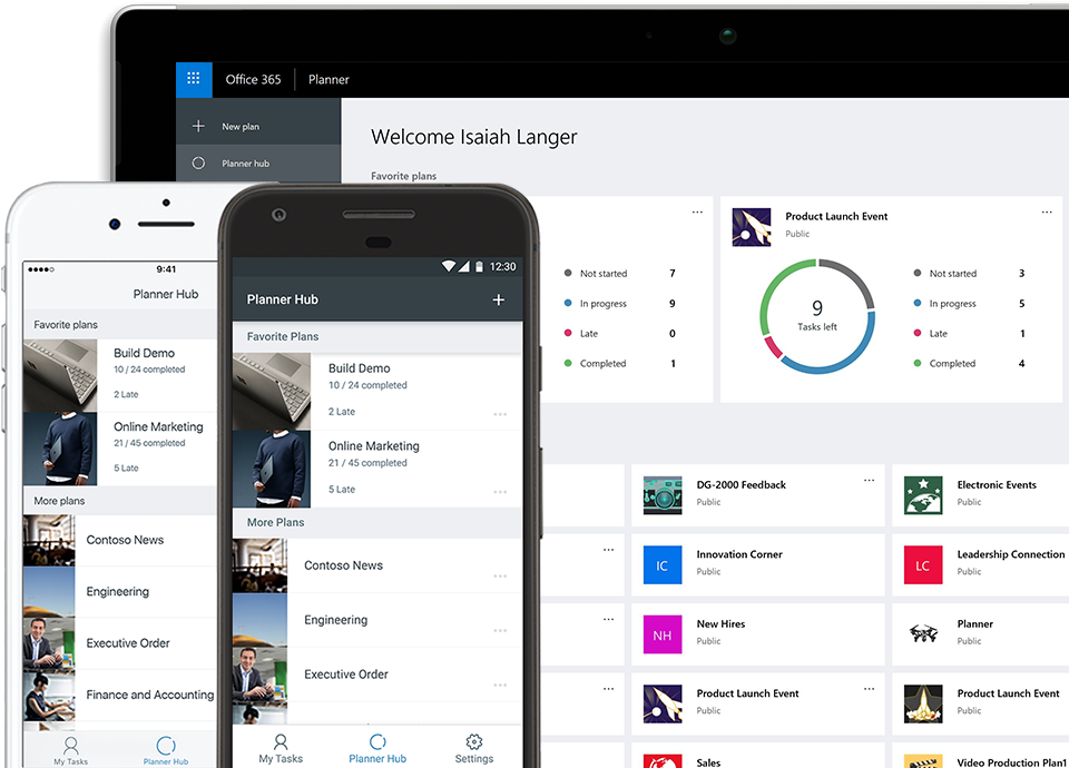
Office 365: Planner


A great service that Office 365 offers to Emporia State's employees is Planner. Planner is a service that allows you, and others, to stay organized on projects. You can have projects for yourself and also projects with a group of people. Planner allows you to sync your projects to your Outlook calendar so you are always aware of your progress and the project’s deadline. Planner will also give you detailed statistics on how your projects have been going, how many you have completed, and how many you have not started. This application is a great way to stay on top of your ongoing projects and is offered to you through Hornet 365.


Sam Derksen
Web Developer
Web and Digital Strategies