Sunday, January 27, 2019

Ready for a new, simple yet more powerful Outlook web experience?

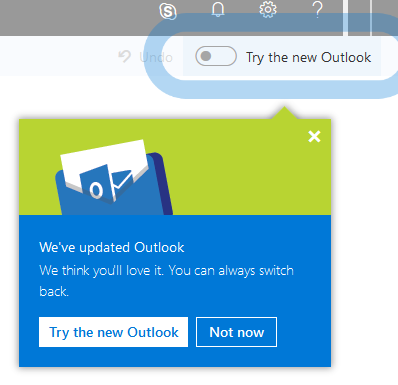
Toggle blog.pngUsers will soon have an opt-in toggle, that will give them the ability to try a new faster, smarter, and more personalized Outlook on the web experience.

When you click the toggle, you’ll see the all-new Outlook on the web modules for Mail, Calendar, and People. Users can opt-in/out as often as they want, meaning you can try it out, then revert back to the classic interface.

Here are some of the features you can expect:

1- Search with smarter, intelligence-driven results based on your recent contacts and activity
2- Files - Browse through a list of the files you've sent or received in a single view
3- Suggested replies allows you to respond to a message with a few clicks
4- Simplified event creation
5- Smart room suggestions
6- Simplified add-in experience
7- More ways to use and manage Groups in Outlook

Try it out soon and look for the exciting new features and design to apply to ESU Outlook users later this year!


Saandhyarag Sasidhar
Student Operations Manager
Web and Digital Strategies

Friday, January 18, 2019

Got a new PC for Christmas?


Join the cool cats this year with Intel's #UpdateMeow campaign and keep your new devices secure!


A couple simple steps will go a long way for security and increased functionality:
  • Download a trusted antivirus software on your device as soon as you receive it! ESU offers Symantec for Windows and Mac for free to current students and employees. Visit hornet.emporia.edu and get your copy!
  • Stay up-to-date: ensure you always download the newest version of apps and programs and update them regularly. Need instructions? Visit the Lock Down Your Login campaign!
  •  Keep a clean machine: run scans at least once a week and periodically review apps to delete the once you no longer need.

Thursday, January 17, 2019

myIT Tip of the Week

SkyPrint Multifunction Printer now in Richel Learning Space

A new machine has taken the place of the color and black and white SkyPrint stations in Cremer Hall 193.

Multifunction Features:
  • Print or copy in color or black and white
  • Scan paper documents to your email, One Drive or Google Drive 
  • Plug in a USB Drive and print files directly from the copier
Cost:
  •  Black and white prints or copies 8 cents a page
  •  Color prints or copies 32 cents a page
  •  Scanning 2 cents per page
  •  To save money use duplex (2 sided) for printing and copying and you will only be charged for one page 

To print send your jobs to SkyPrint the way you always have. When you arrive at the station, you will sign in to release your print jobs. One new option is that you can now sign in with your ESU ID card. Once you have your card set up, you can walk up and tap your card to sign in and release your print jobs. 

Friday, January 11, 2019

A Student's Best Friend: The Echo Dot

Amazon's third version of the Echo Dot is quite an improvement. Improved hardware has caused the third version to be lighter, smaller, and an expert at voice recognition. We've recently had the chance to play around with some of the new Echo Dot's functionalities, and for only $29.99 on Amazon, it is something that every student could utilize. The Echo Dot can easily hear, and understand you from anywhere in the room. In addition to all of the pre-built functions of the Echo Dot, there are also many options for customization. With the help of Alexa Skill Blueprints, you're able to add many different skills to Alexa. Very useful for students, you can have your Echo Dot ask you questions, recite definitions, and quiz you on whatever topics you'd like. This is a very handy feature as it can make you feel as if you're studying for a test with another human!

Sam Derksen
Student Web Developer
Web and Digital Strategies

Thursday, January 10, 2019

What is Your Digital New Year's Resolution?

Millions of Americans make new year's resolutions every year and you probably did too. Most of us think of things related to eating healthier, getting more exercise or saving more money. Something about one year ending and another beginning causes us to reflect on our habits and want to improve ourselves. While we usually consider life style choices, we seldom think about our information online and how we interact with technology every day. Some of us have vowed to cut down on screen time for our family but do we really think about protecting our online lives?


MarketWatch published an article in August 2018, reporting on a new Nielsen study that suggests American adults spend more than 11 hours per day watching, reading, listening to or interacting with media. With so much of our time spent in front of screens (probably more than we would ever think to exercise), it seems surprising that protecting our digital life is not one of the first things we think about.

Maybe it's time to rethink our New Year's Resolution this year and we have some suggestions for you!

  • Since the majority of people don't stick to personal promises like vowing to exercise and saving more money, consider kicking of 2019 with one simple habit - follow the #UpdateMeow campaign on our Facebook and Twitter pages to receive regular reminders to update your software and devices. It doesn't take long, but will significantly enhance your security and user experience!

  • Lock down your login! One of the most critical things you can do to prepare for a great year is creating unique passphrases for each online account paired with a second factor, such as a one-time code sent to your phone. Simple usernames and passwords are not enough to protect your important online accounts, especially email, banking, and health care. Learn more at lockdownyourlogin.org

  •  Manage your privacy settings! Want to change your settings but can't find them? Visit staysafeonline.org and use the direct links listed there.
    Data Privacy Day is coming up on January 28, so stay tuned for details!
Are you ready for your Digital New Year's Resolution?

Sunday, December 9, 2018

A Good Year for Apple Hardware

This year has been a fairly extensive one in terms of updates and new releases from Apple. From the latest MacOS update “Mojave” to this year’s round of iPhone refreshes, the Cupertino-based company has served up a considerable number of new items for consumers to choose from.  I will highlight two that have greatly enhanced my personal workflow.

The first is what I call Apple’s most underrated product of the year—the MacBook Pro refresh.  It didn’t get a big Apple Event debut but came packed with new features—especially if you hadn’t purchased last year’s model. Eighth generation Intel processors, True Tone display, T2 security chip, updated graphics and a slightly-tweaked keyboard are all highlights packed into the MacBook Pro’s trademark aluminum chassis. As expected, the MacBook Pro continues its trend of releasing 13 and 15 inch models.  While I had never warmed up to the Touch Bar, these new models showcase the efforts developers have included over the past few years to bring out the features of the Touch Bar.  Add to that the capability of Touch ID and you have a device that feels incomplete without it.  And to top it off, “Hey, Siri” is now supported!

Unlike the MacBook Pro, Apple’s other winner did get a lavish debut this fall--the iPad Pro.  If you’ve previously used an iPad or iPad Pro—forget what you knew. Throw it out.  This third generation tablet is a complete refresh in every way including the overall look of the device.  It comes in 12.9 and 11 in models, but it’s smaller in size than previous generations.  The home button is gone, and the Liquid Retina display extends nearly all the way to the edge.  

iPad Pro
The iPad Pro (third generation)
Internals include a new superfast A12X Bionic processor and a TrueDepth camera with Face ID—yes, your iPad now recognizes you (similar to Microsoft’s Windows Hello tech).  For us digital artists, the iPad Pro has a new Apple Pencil, which has double tap feature for switching between brushes, erasers, etc.  Like the Surface Pen, the Pencil now magnetically attaches to the iPad—but it also CHARGES it.  No more strange connection sticking out of the bottom (see previous iPad Pro’s).  And while I’m not sure the full benefit of it yet, the new USB-C port is undoubtedly a move in the right direction.  And for those who want a keyboard, Apple's Smart Folio Keyboard attaches with magnets located across the entire iPad, providing a strong grip.  I went for the less expensive Smart Folio case which essentially provides protection from the front and back, but leaves the sides exposed.  Apple continues to proclaim the iPad can replace your laptop and while I'd be lost without my MacBook Pro and Surface Pro, the new iPad Pro takes a giant leap in that direction and with a few tweaks to iOS could become one's daily driver.

As I mentioned, these are only two devices that Apple launched in 2018.  Beyond the three iPhones, there was the Apple Watch and the long-awaited updates to the MacBook Air and Mac mini.  With semi-recent updates to the iMac, MacBook and AppleTV there are many worthy options available to you.  The best recommendation I can offer is to do your research and make sure you know how you're going to use your new tech in advance.

ESU students, faculty and staff get a discount on most of Apple’s hardware, so make sure to take advantage of that if you’re in the market for a new device.  


Brian Osbourn
Director, IT Web & Digital Strategies


Friday, December 7, 2018

Stay safe online this holiday season!

The busy holiday season is in full swing and between choosing gifts, baking cookies and keeping track of holiday activities, time just seems to fly by!

In all the busyness and rush, it is important to remember that the online world is just as active - who else ordered most gifts online? Sadly, this is also the prime time for cyber criminals who take advantage of our distraction.


Here at ESU, we work diligently to put new technical safeguards in place but we have also learned that the best defense against cyber criminals is you! So how do you stay safe online this holiday season?
  1. Lock down your login: Protect your online shopping, email, banking and other important online accounts. Create unique passphrases for each account and use multi-factor authentication whenever possible.
  2. Your information is like money. Value it. Protect it.: Monitor your financial accounts regularly and request a free credit report once a year. Learn more about identity theft prevention at identitytheft.gov.
  3. Keep clean machines: Only download trusted apps, software, and updates. Make sure your devices are free of viruses and malware before you shop. Keep up-to-date and download ESU's free antivirus software here.
  4. When in doubt, throw it out: Avoid links from unknown sources in emails, text messages, and on websites. Be especially cautious with emails about problems with your credit card or account or status of an online order. Report anything suspicious to the IT Help Desk at helpdesk@emporia.edu immediately.
  5. Do your research: Be aware of scams and ads that sound too good to be true. The Federal Trade Commission publishes a list of scam alerts here. Before you shop, research the websites you are going to use. Read reviews and pay attention to other people's experiences with the company. Pay special attention to the URL of popular sites. For example, criminals may create a fraudulent site called www.shop-amazon.com instead of the legitimate www.amazon.com.

 Keep your friends safe and share the Cheer to Safe Cyber Shopping tip sheet! Happy holidays :)

Thursday, December 6, 2018

The End of Microsoft Edge

News that Microsoft Edge's discontinuation is becoming apparent and the replacement will be a Chromium-based web browser. Today Microsoft CVP Joe Belfiore solidified these rumors by concluding this move will add "better web compatibility" and "less fragmentation" throughout the web.

This change to a Chromium base will ideally run and function better on Windows 10. For developer, this means they will have less cross-browser compatibility to worry about when building websites. Edge will advance faster with this change.

World wide implementation of the Chromium-based Edge web browser will appear sometime in 2019.

Donald Goode
Student Web Developer
Web & Digital Strategies