Wednesday, September 13, 2017

myIT Tip of the Week


Using the OneDrive Mobile App to Scan

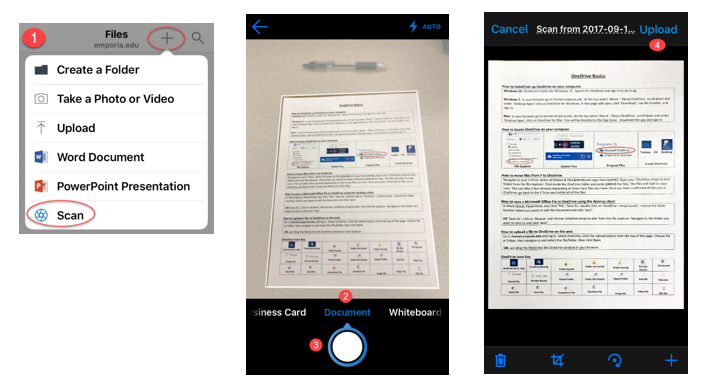
The OneDrive app makes scanning a paper document, whiteboard or business card a breeze from the convenience of your mobile device's camera. The app takes a picture then creates a clean digital copy. 

Here's how it works:

1. Open the OneDrive app, under ‘Files’ click on the + and choose scan.

2. From the slider at the bottom choose: business card, document, or whiteboard.


3. Your camera will start to frame the image. Click on the shutter (circle) to snap a picture.

4. You will then see a preview of the file. From this screen you can name the file, crop, or rotate it. Then save the file to OneDrive by clicking upload.


If you like this feature be sure to check out another app from Microsoft called Office Lens.


Wednesday, September 6, 2017

myIT Tip of the Week


 Welcome to the IT Tip of the Week! 

We are beginning a regular posting to the blog with IT Tips.  The tips, submitted by Help Desk staff will be informative, and hopefully a bit of fun, too.  We’ll touch on various topics of interest from technology at ESU, to tips for using Microsoft Office or Windows, to technology training opportunities.  

In fact, in September, we are having sessions on using Windows 10.  For example, using Windows 10, if you have multiple windows open, you can minimize all but the current, active one with one step.  Just grab the title bar (with your mouse) of the window you want to remain open and move it back and forth quickly (shake it).  All other windows will minimize, leaving only the window you are shaking open.  If you want to open it again, just shake again.

For more insight into Windows 10, check out our training calendar here.   Also, from the training page, you can go to the link to add your own suggestions for training or class ideas.


Tuesday, September 5, 2017

Announcing National Cyber Security Awareness Month


The IT Security team is proud to announce that for the second year in a row, ESU is a National Cyber Security Awareness Month Champion!


Please join us in our celebration of National Cyber Security Awareness Month at the following events:

Featured Event:
Steve Riat "Exponential Change"
October 18, 2017
7 p.m.
Preston Room

Video/Poster Contest "Information Security"
October 1-20, 2017

Movie Night 
October 4, 2017 
free pizza!!

Donuts & Coffee with the ISO
details to come!

  
Please visit our website sky.emporia.edu/itsecurity for details on upcoming events. If you would like to promote National Cyber Security Awareness Month in your office, please contact Franzi at fwillenb@emporia.edu for information and resources.

Celebrated in October, National Cyber Security Awareness Month (NCSAM) is a shared initiative led by the National Cyber Security Alliance and the U.S. Department of Homeland Security. Under the motto "Staying safe and secure online is our shared responsibility," the initiative's mission is to provide people with resources to stay more secure online. As a champion this year, ESU has committed to promote this mission and make resources available during the month of October.
To learn more about National Cyber Security Awareness Month, please follow this link: https://staysafeonline.org/ncsam

Friday, August 25, 2017

Hornet TV - The Digital Pulse of the University

Hornet TV Eclipse PhotoHornet TV, ESU’s visual communications platform, continues to deliver immersive and interactive content across the web, mobile devices and digital signage.  Most recently, custom mobile digital signs were developed with interactive maps to assist campus visitors with parking and shuttle service during residence hall move-in. 

A few days later, Hornet TV was used to broadcast the solar eclipse to all platforms, including feeds from NASA.

The latest update to Hornet TV debuted this week with a refreshed and streamlined new interface for digital signs and the introduction of a “beta” livestream which showcases ESU promotional content, videos, web series and more.  Moving beyond digital signage, the new Hornet TV is expanding to become a fully integrated platform that visually represents the digital pulse of the university.  Over the next year, IT plans to work with current channel owners and others content creators, including students, to develop new types of content and truly showcase the digital experience at ESU.

Move-in Day Signage


The public preview is available by going to share.emporia.edu/hornettv.  Students and employees can find more information about Hornet TV by going to the HORNET 365 portal at hornet.emporia.edu.

Be Aware of Ransomware!

Ransomware is a type of malware designed to encrypt users’ files or lock their operating systems so attackers can demand a ransom payment. According to a 2016 Symantec Report, the average ransom demand is almost $700 and “consumers are the most likely victims of ransomware, accounting for 57 percent of all infections between January 2015 and April 2016.”

Similar to a phishing attack, ransomware is triggered when a user is lured to click on an infected link or e-mail attachment or to download a file or software drive while visiting a rogue website. Sophisticated social engineering techniques are used to entice users to take the desired action; examples include
  • an embedded malicious link in an e-mail offers a cheap airfare ticket
  • an e-mail that appears to be from Google Chrome or Facebook invites you to click on an image to update their web browser
  • a well-crafted website mimics a legitimate website and prompts you to download a file or install an update that locks their PC or laptop.
One of the best-known, most recent ransomware attacks is WannaCry, which infected approximately 200,000 computer across 150 countries. Organizations most impacted by the attack include hospitals in the UK, as well as Nissan and Renault who had to stop production. This attack provides testimony of how quickly ransomware can spread an affect people around the world.

So, what can you do to protect yourself?
  • Delete any suspicious e-mail. Messages from unverified sources or from known sources that offer deals that sound too good to be true are most likely malicious. If in doubt, through it out and contact the alleged sender or company via phone.
  • Avoid clicking on unverified e-mail links or attachments. Suspicious links might carry ransomware.
  • Install and maintain up-to-date antivirus software. Keeping your operating system updated with the latest virus definitions will ensure that your security software can detect the latest malware variations. ESU offers Symantec anti-virus for FREE!
  • Update all devices, software, and plug-ins on a regular basis. Check for operating system, software, and plug-in updates often — or, if possible, set up automatic updates — to minimize the likelihood of someone holding your computer or files for ransom.
  • Back up your files. Back up the files on your computer, laptop, or mobile devices frequently so you can access your backups when files get locked.
For more information on how you can protect yourself, visit the IT Bookshelf.

Source: EDUCAUSE

Friday, August 18, 2017

Welcome back, Hornets!

The IT Security team welcomed international students from all over the world and provided information at move-in days this week. It was a truly great experience to get to know you all! Welcome to Emporia, Hornets, we are so glad to have you!

If you need help getting your devices set up or have any questions, call the IT Help Desk at 877-341-5555. Remember, Anti-virus and Microsoft Office are available to download for free!

And, don't forget the semester kick-off Block Party downtown on Monday, August 21 from 6 p.m. to 8 p.m. Play games, win prizes and have fun!


Friday, August 11, 2017

Consider a Career in Cybersecurity!

The Global Information Security Workforce Study reports that by 2022, there will be 1.8 million open positions in the Cybersecurity field - yet our generation isn't going for the jobs. The study indicates only 7% of cybersecurity workers surveyed are under the age of 29.

The reason for this may be the common misconception that, unless you have a degree in Computer Science, you can't enter the field. While technical skills are of advantage, hiring managers are increasingly looking for people in liberal arts and other fields, due to their advanced analytical, research and communication skills. The study reports 87% of cybersecurity workers did not start out in the field and 30% came from non-technical backgrounds.

Another reason for the significant talent gap may be that cybersecurity simply isn't what crosses our mind when we first start thinking about our careers. An unawareness of opportunities prevents college grads from even considering the cybersecurity field, even though careers can be very lucrative and rewarding. However, while employers are working on raising awareness and advertising job opportunities, there is something you can do!

Check out our Cybersecurity Careers infographic and find out if a career in cybersecurity is right for you!

Friday, August 4, 2017

Alexa, are you listening? - The Internet of Things around Us

A Blog post published by MWR Labs titled "Alexa, are you listening?" describes a recently discovered vulnerability which allows a hacker to install malware on the Amazon Echo without leaving a visible trace. For the technical specifications of the vulnerability, please find the full post here.

But what does this mean for us? In the case of the Amazon Echo, this means that someone with physical access to the device could establish a remote connection and listen to anything in the room the microphone picks up, as well as use the device for other malicious activity.
However, this is not a single case. People are becoming increasingly connected with a wide range of devices and while most of them are aware of computers being hacked, a lot of them don't think about equally securing other devices they frequently use, such as
  • webcams
  • security cameras
  • video recorders
  • printers
  • baby monitors
  • home lighting system
and similar devices. The question now becomes, how can we protect ourselves?
There are several steps we can take to reduce the chances of compromise. Making sure default login credentials are changed on each device and creating strong passwords create a layer of protection. Paying attention to the device manufacturer and security features can help you pick out quality devices. Finally, safeguarding your home network builds a strong defense.

Learn more with our Internet of Things Infographic!

→ What do you think about becoming increasingly connected? Let us know on Facebook
      ESU Information Technology